Tap to pay
Speed through checkout with a simple hover.
 United States



Skip the swipe or chip insert. Pay in seconds with contactless tap-to-pay plus enhanced security everywhere Mastercard® is accepted.1
Speed through checkout with a simple hover.

Skip the swipe or chip insert.

Advanced fraud protection with every purchase.
Get all the details on our new contactless debit cards.
A contactless debit card is a type of debit card that allows you to pay by tapping the card on the payment terminal where the contactless payment symbol is displayed. No swiping or inserting is required.
Popular Bank is upgrading to new Mastercard® debit cards as they come with a number of key benefits, including enhanced security, smart chip technology, updated design, contactless tap-to-pay transactions, and more.
Your new card with contactless technology will arrive by mail between September 16 and December 6, 2025. Most customers can expect delivery within the next few weeks.
To use a contactless debit card, tap or hover the card above the payment terminal where the contactless payment symbol is displayed when prompted.
When you receive your new contactless debit card in the mail, activate it as soon as possible, sign the back, and safely destroy your old card. Instructions for activation will be included with your new card.
Activate your new contactless debit card by calling the phone number on the sticker on the front of the card, or by using your card with your PIN at any merchant or ATM.
Your current debit card will remain active until you activate your new card or until its printed expiration date.
You can use contactless payments with your new debit card anywhere you see the contactless payment symbol including major retailers, restaurants, and transit systems.
No, your Popular Online Banking credentials stay the same. Only the expiration date and CVV of your new debit card will change.
If you tap your contactless debit card twice, don't worry. You won’t be charged twice.
Yes, you can still swipe or insert your contactless debit card. It still works with a chip and magnetic stripe if contactless payments are not available.
To add your contactless debit card to your mobile wallet, follow the instructions specific to your mobile wallet app.
After completing the in-app steps, you will be prompted to verify your identity and register your mobile device. Please note that it may take up to 48 hours to use your newly enrolled debit card with your mobile wallet.
Learn more about these mobile wallets
In most cases, any merchants your old card is linked to, including any recurring billings, will automatically update your new expiration date and CVV. In the event your card details are not automatically updated with one of your merchants, you should receive an email from the merchant alerting you that your payment details need to be updated.
If your new card hasn’t arrived by December 6, 2025, contact the Customer Care Center or talk to a banker at your nearest branch.
Access your money surcharge-free at any of the 55,000+ Allpoint® ATMs worldwide.2 Find them in places you already love to shop like CVS®, Walgreens®, Target®, and more. If you can see the Allpoint® logo on the ATM, you can withdraw worry-free.
Find ATMs

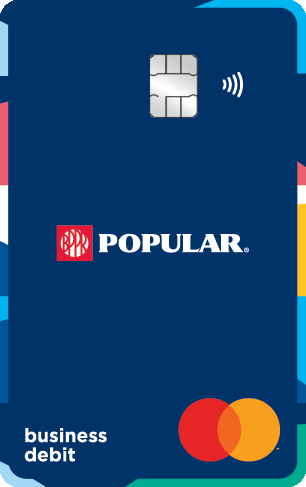

For more information about your new contactless Popular Bank Mastercard® debit card, visit your nearest branch or get in touch with our Customer Care Center today.
Contact us
1If you choose to opt in to ATM/Debit Card Overdraft Coverage, overdraft fees may still be charged if adequate funds are not available in the account at the time of the transaction.
2Popular Bank and its affiliates are not affiliated with ATM National, LLC. Allpoint® is a registered trademark of ATM National, LLC. For a complete list of in‑network ATMs visit our Branch and ATM Locator.
Target® is a registered trademark of Target, Inc. Walgreens® is a registered trademark of Walgreens Boots Alliance, Inc. CVS Pharmacy® is a registered trademark of CVS Health.
Apple Pay® is a registered trademark of Apple, Inc. Google Pay™ is a trademark of Google, Inc. Samsung Pay® is a registered trademark of Samsung Electronics Co., Ltd. Mastercard and the Mastercard Brand Mark are registered trademarks of Mastercard International Incorporated. Debit cards are issued by Popular Bank.